Putting a live HLS origin behind a CDN
Make a live HLS origin cacheable behind a CDN: stable URLs, cache keys, Cache-Control per file, cached 404s, CORS, origin shield and allow-lists.
Contents
A CDN in front of a live HLS origin should mean each segment leaves your server a handful of times, however many people watch. Whether it does depends on details that are easy to get wrong and hard to see: the URLs your origin hands out, the headers on each kind of file, and every layer between the origin and the viewer that has its own opinion about caching.
In short: A CDN only protects a live origin if every viewer requests the same URLs: no per-viewer session ids, and no query strings in the cache key. Give media playlists about a one-second lifetime, segments about a minute, and errors no-store so an early 404 isn’t served to everyone. Check headers at every hop, send CORS headers when the player is on another domain, and confirm request collapsing and an origin shield with the CDN that pulls from you.
A CDN caches by URL
The first question is whether two viewers asking for the same segment ask for the same URL. Some streaming servers put a per-viewer session id in every playlist and segment name. Wowza, for example, serves chunklist_w123456.m3u8 and media_w123456_207.ts, with a different w… number for each viewer. To a CDN those are different files. A thousand viewers means a thousand cache misses for the same segment, and your origin serves all of them.
There are two ways out. Some servers have an origin or “cache-friendly” mode that drops the per-session part. Alternatively, if your platform writes the playlists viewers receive, it can point everyone at one stable id per stream, so every viewer and every CDN edge requests identical URLs.
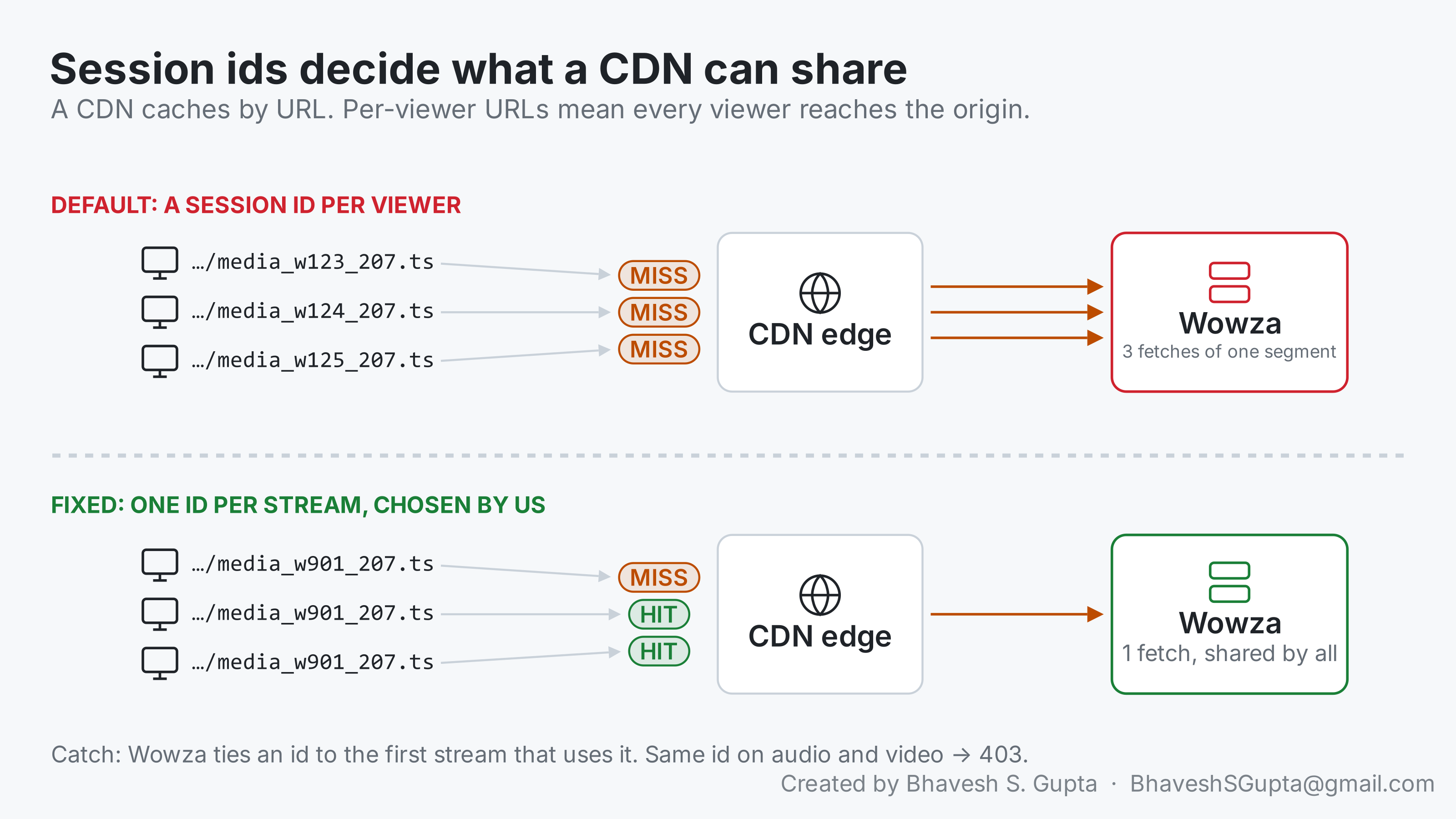
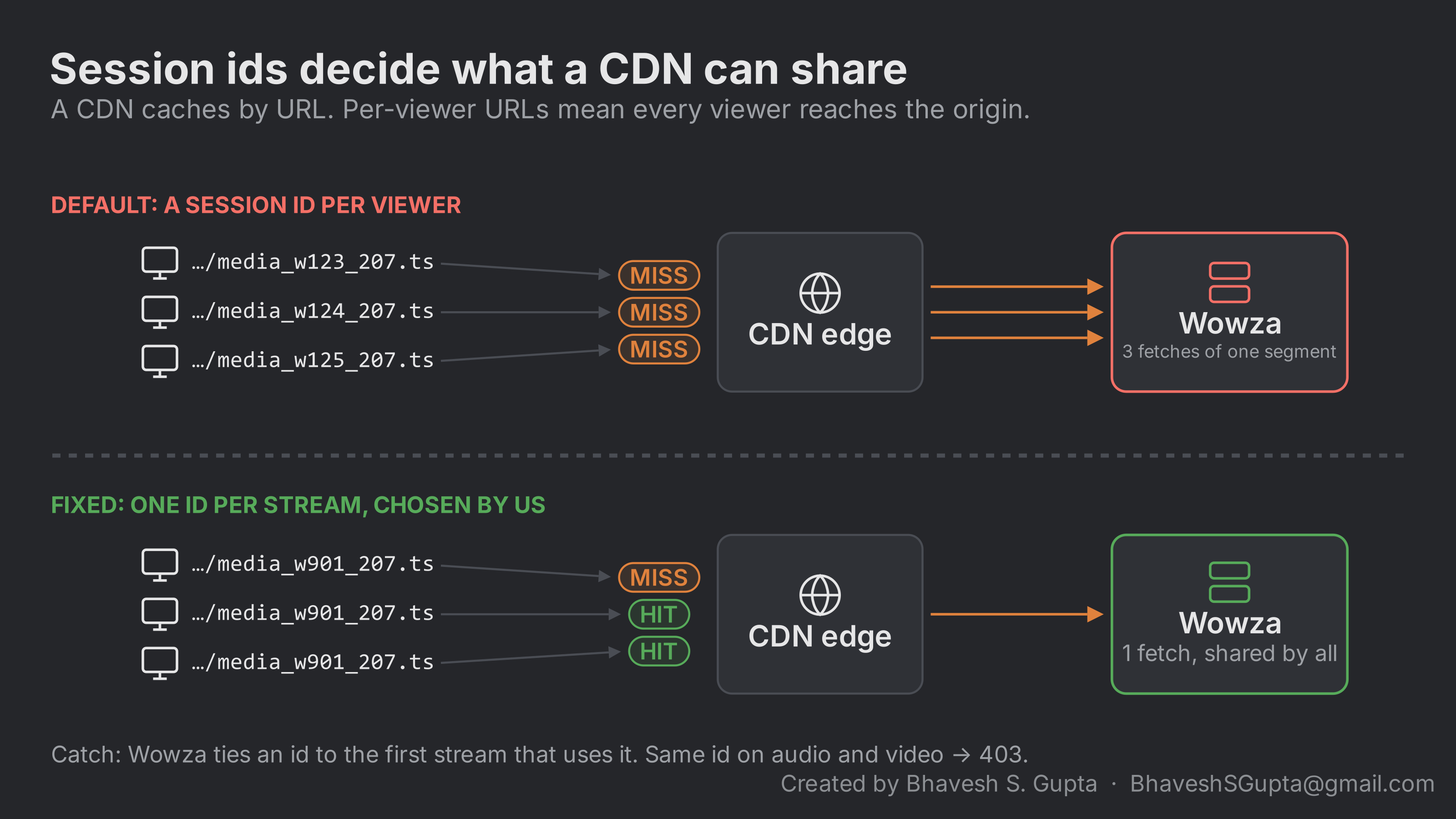
If you choose stable ids, test how your server treats them before relying on them:
- Two requests with the same id get byte-identical playlists and segments.
- The playlist keeps advancing on every quality.
- After a few minutes with no requests, the same URL still works.
- After an encoder reconnect, the same URL still works.
- The same id on two different streams. Wowza binds an id to the first stream that uses it and answers 403 for any other stream, so audio, video and every quality need their own id.
Query strings and the cache key
A CDN doesn’t cache by path; it caches by a cache key, which by default includes the query string. So the same trap can come back through a different door. If your player adds a per-viewer token (?token=…), a cache-buster (?t=1696500000) or analytics parameters to playlist and segment requests, every viewer is again asking for a different URL, and every request is a miss.
Three ways around it:
- Leave the query string out of the cache key for playlists and segments, if the origin doesn’t need it to decide what to send. Most CDNs have a setting for this; on Cloudflare it’s part of the cache key options in a cache rule.
- Check tokens at the edge, then drop them. If tokens are for access control, let the CDN validate the signature and cache the file under the plain path.
- Put the token in the path, once per stream, not per viewer. A signed path segment shared by everyone watching a stream is cacheable; one per viewer isn’t.
The quick test is the same as for session ids: request the same segment twice with different query strings and see whether the second one is a cache hit.
Cache headers, per kind of file
Each kind of file needs a different lifetime:
| File | Suggested Cache-Control | Why |
|---|---|---|
Media playlist (.m3u8) | max-age=1 (at most half the target duration) | Changes every segment; stale copies hold viewers back from the live edge |
Segment (.ts, .m4s) | max-age=60 or so | Never changes once written, and stops being requested soon after it leaves the live window |
| Master playlist | Short, and set explicitly | Rarely changes, but a missing header leaves the CDN to guess |
| Any status ≥ 400 | no-store | A 404 for a segment that doesn’t exist yet must not be cached |
The last row matters more than it looks. At the start of an event, someone always opens the page early. Their player asks for a playlist that doesn’t exist yet, and the origin answers 404. If any cache keeps that 404 for a few minutes, everyone who joins in those minutes gets an error, even though the stream went live behind it.
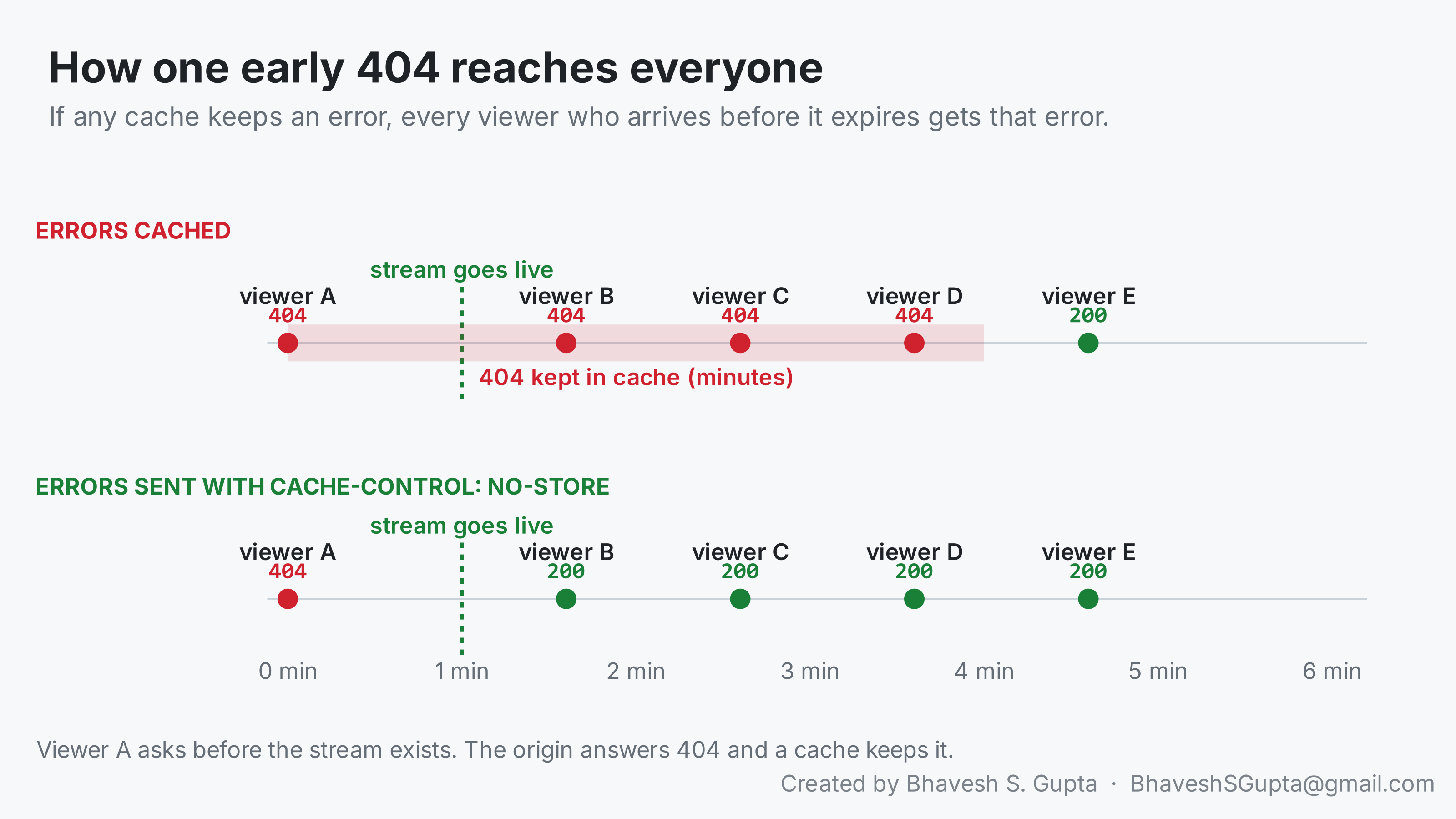
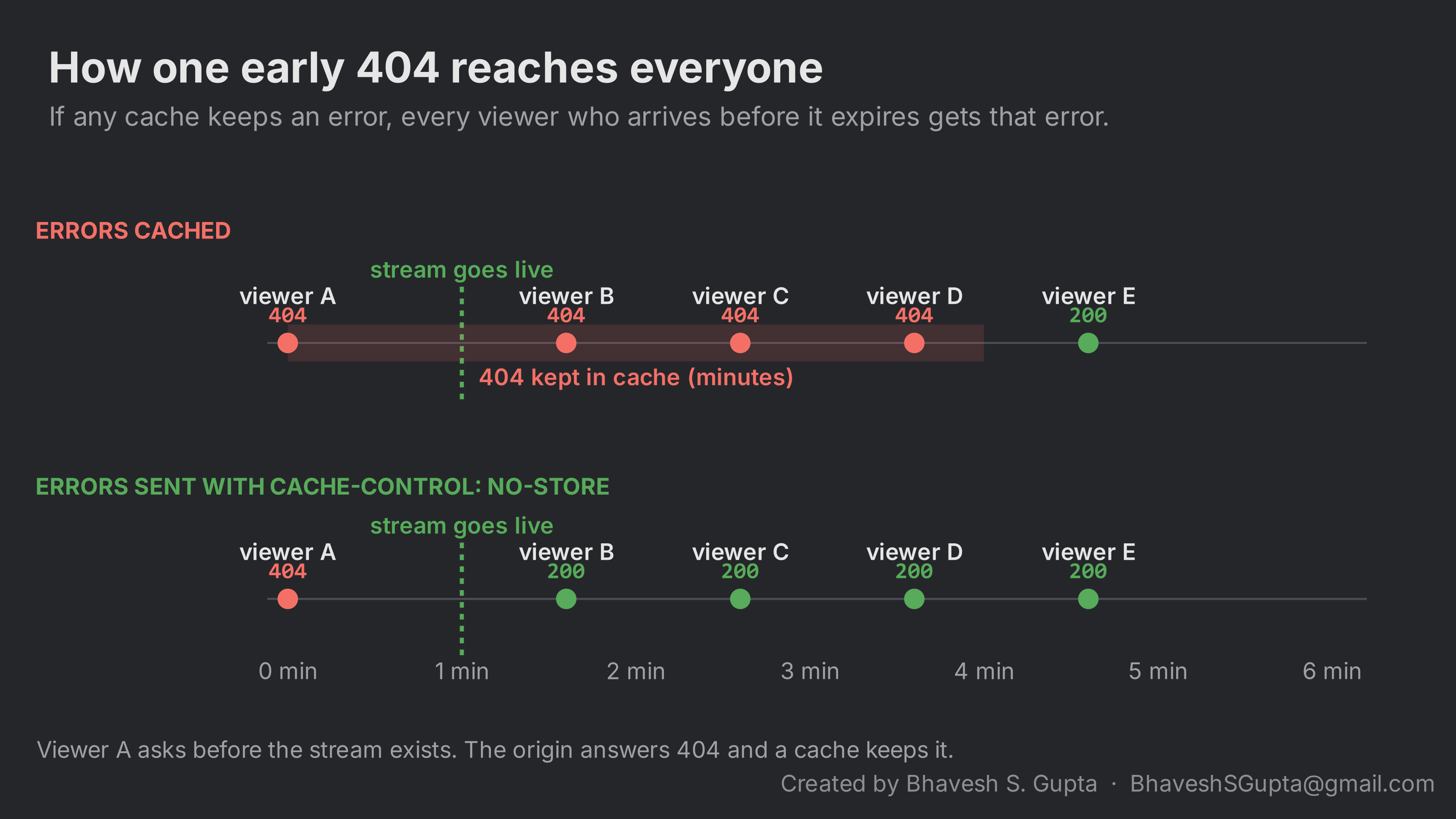
The same thing happens to a single segment. A player that asks for the newest segment a moment before the origin finishes writing it gets a 404, and if that’s cached, the segment stays missing for everyone for its whole time in the playlist.
Keep the segment lifetime short even though segments “never change”. Many servers restart segment numbering when the encoder reconnects and reuse the same file names. A long cache would then serve the previous run’s segment under the new name.
Where the headers come from
Your origin may not let you set these headers; streaming servers often send Cache-Control: no-cache on everything. The CDN may mirror origin headers, apply its own defaults, or both. If you put a proxy such as Cloudflare between the two, it can set the headers per file type with response-header rules.
Whatever the setup, check what reaches the viewer, not what you configured. One curl per hop shows it:
| |
curl -sI makes a HEAD request and prints only the response headers; grep keeps the ones that matter for caching. Example output:
== https://origin.example.com/live/s1/media_207.ts
HTTP/1.1 200 OK
Cache-Control: no-cache
== https://proxy.example.com/live/s1/media_207.ts
HTTP/2 200
cache-control: max-age=60
cf-cache-status: DYNAMIC
== https://cdn.example.com/live/s1/media_207.ts
HTTP/2 200
cache-control: max-age=600
age: 41
x-cache: HIT
Read it top to bottom. The origin says no-cache; the proxy replaces that with max-age=60 and doesn’t cache it itself (DYNAMIC); the CDN serves it from its cache (HIT, kept for 41 seconds so far) but with max-age=600, so somewhere in the CDN’s own config the header is being rewritten.
On Cloudflare, cf-cache-status tells you what its cache did with the request:
| Value | Meaning |
|---|---|
HIT | Served from Cloudflare’s cache |
MISS | Not in cache; fetched from the origin (and possibly stored) |
EXPIRED | Was in cache but stale; fetched again |
REVALIDATED | Was stale; the origin confirmed it hadn’t changed |
BYPASS | A rule or header told Cloudflare not to use the cache |
DYNAMIC | Not eligible for caching by default (no rule made it cacheable) |
age is how many seconds a cached copy has been held. On a request that should never be cached, a HIT with a growing age is the sign something is wrong.
A CDN that rewrites max-age=60 to max-age=600 on segments will look right in every config screen and still be wrong on the wire.
CORS: when the player and the stream are on different domains
If the page that plays the stream is on www.example.com and the stream comes from cdn.example.com, the browser treats every playlist and segment request as cross-origin. hls.js fetches them with JavaScript, so each response needs a CORS header or the browser blocks it, even though the same URL works perfectly with curl:
Access-Control-Allow-Origin: *
Use your page’s origin instead of * if the stream shouldn’t be playable from other sites. Three things to check:
- The header survives every hop. The origin, any proxy and the CDN all have to pass it through. Check it with the same
curl -sIloop as above, with-H "Origin: https://www.example.com"added. - Cached responses keep it. If you return different
Access-Control-Allow-Originvalues for different requesting sites, also sendVary: Origin, or the CDN may serve one site’s header to another. - Preflights are answered. Plain GET requests don’t trigger a preflight, but a player that adds custom headers does. Then
OPTIONSrequests need a200withAccess-Control-Allow-MethodsandAccess-Control-Allow-Headers.
Safari’s native player loads HLS without CORS checks, so a missing header often shows up as “works in Safari, fails in Chrome”, the opposite of the pattern in part 4.
Cloudflare cache-rule traps
If Cloudflare sits in front of the origin, three behaviours are worth knowing before you write any rules:
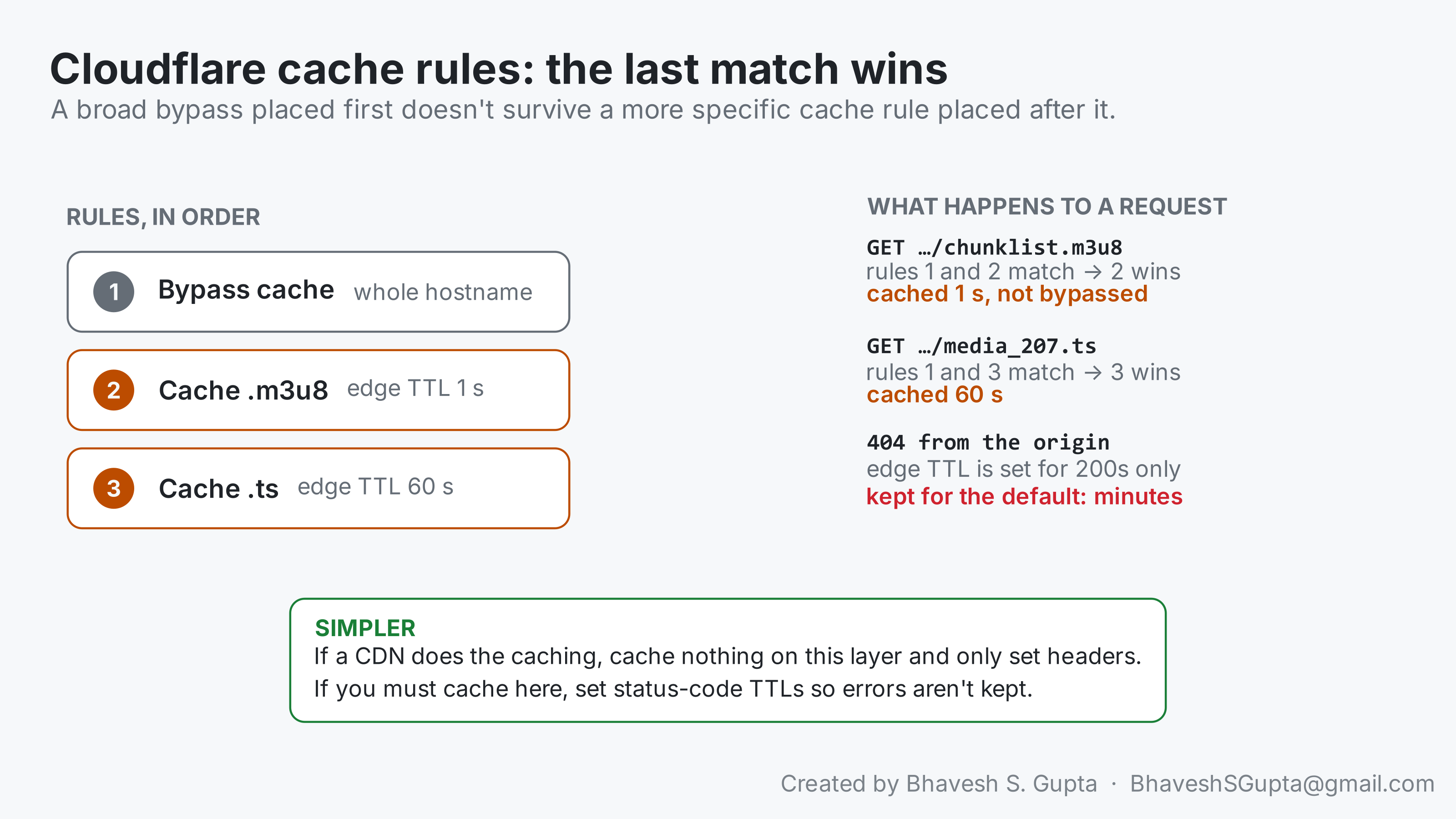
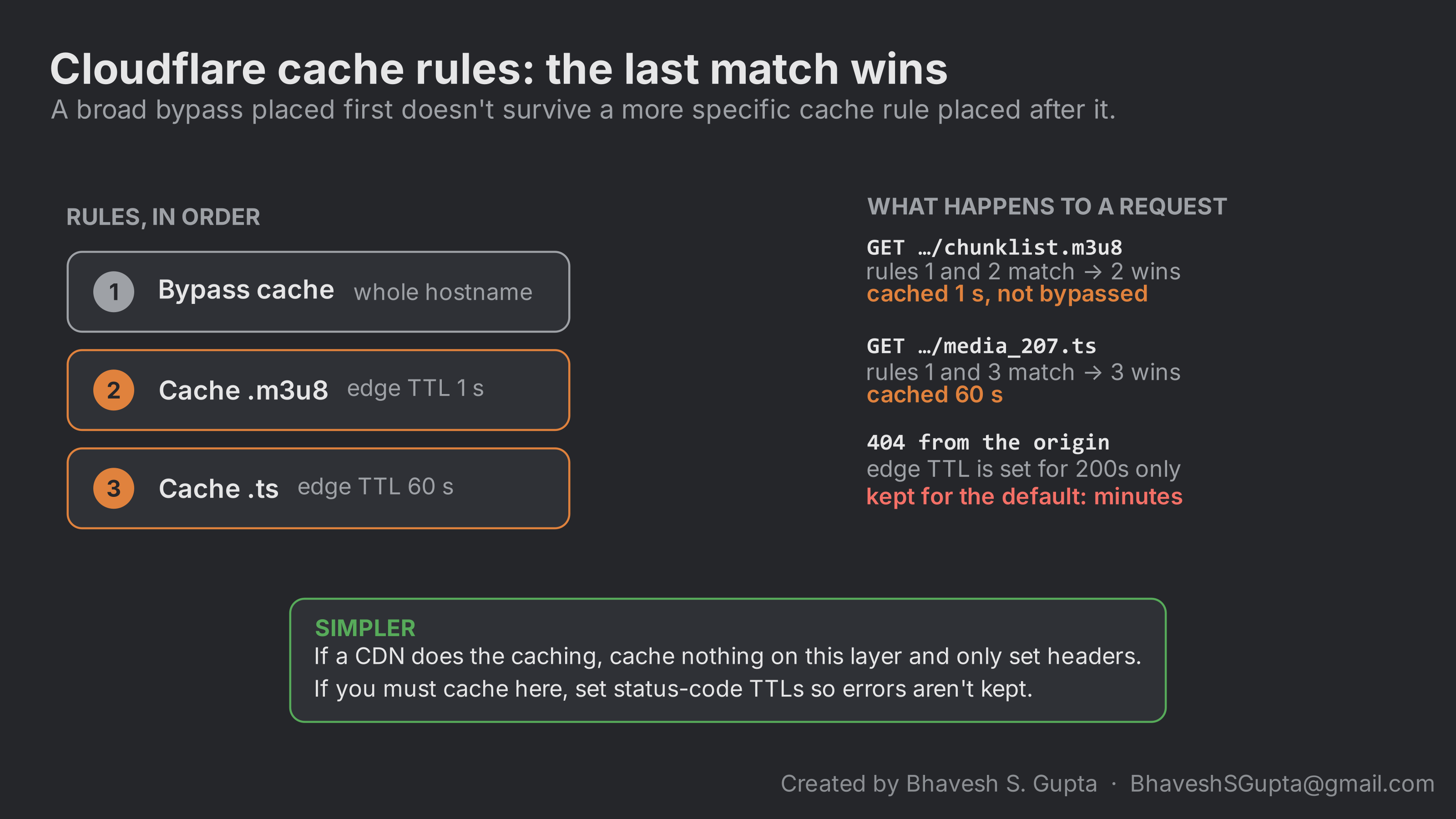
- When cache rules conflict, the last matching rule wins (
rule order). A “bypass cache for this hostname” rule followed by “cache
.m3u8for 1 second” doesn’t bypass anything for playlists. - An edge TTL you set for successful responses doesn’t decide how long errors are kept. Without a status-code TTL, a 404 gets Cloudflare’s default lifetime ( default cache behaviour), which is minutes. Set status-code TTLs explicitly, or don’t cache on that layer at all.
- Response-header rules change what the next hop sees, not what Cloudflare itself caches (
response header modification). Setting
Cache-Control: no-storeon 404s with a transform rule tells the CDN behind Cloudflare not to keep them; it doesn’t stop Cloudflare’s own cache.
You can see the problem from outside without access to the dashboard. Request a URL that doesn’t exist yet, twice, a few seconds apart:
| |
Example output from the second and third tries, a minute apart:
HTTP/2 404
cf-cache-status: HIT
age: 12

HTTP/2 404
cf-cache-status: HIT
age: 74
If the second response says cf-cache-status: HIT and age keeps growing on later requests, an error is being cached.
A simple arrangement avoids most of this: if a CDN does the caching, let the proxy in front of the origin cache nothing and only set headers. Then there’s one cache to reason about.
No cache isn’t the same as no offload
Two numbers describe how well a CDN protects the origin, and they measure different things:
- Cache share: the fraction of bytes the CDN served from cache.
- Offload: bytes the CDN delivered, divided by bytes the origin sent.
They can disagree completely. A CDN that pulls one RTMP stream per quality per server and repackages it for every viewer has no HTTP cache, so its cache share is 0%, but it can still deliver many times what it receives. Move to HLS pull and the HTTP cache becomes the only thing between viewers and the origin.
Offload also depends on things that have nothing to do with how well the cache works:
- Audience size. Offload is roughly viewers per origin fetch. Ten viewers sharing a segment can’t produce a 50× ratio.
- Request collapsing. If simultaneous misses for the same new segment all go to the origin, each segment is fetched several times at the live edge.
- Re-fetches. A segment requested again after its cache lifetime counts again.
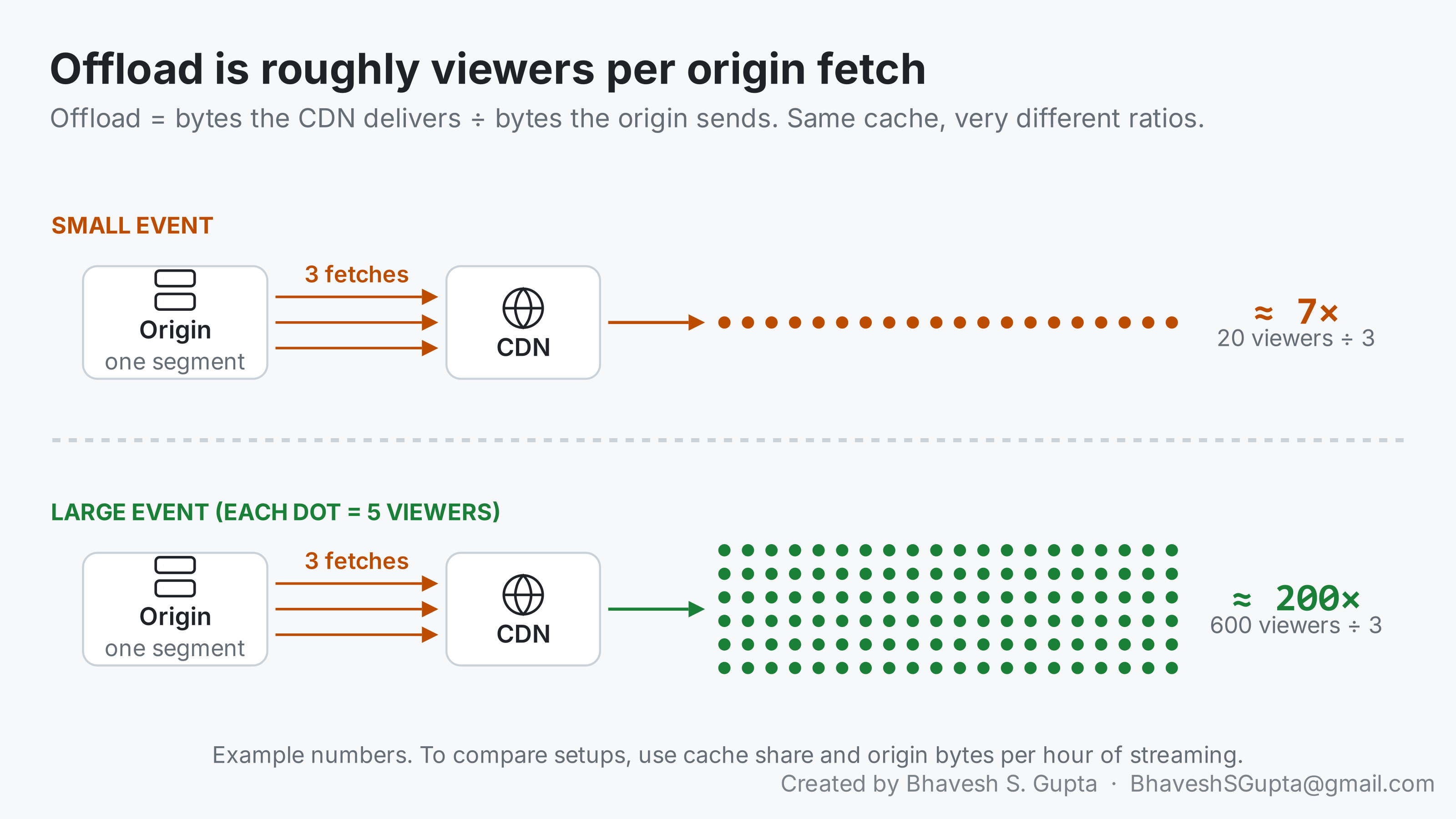
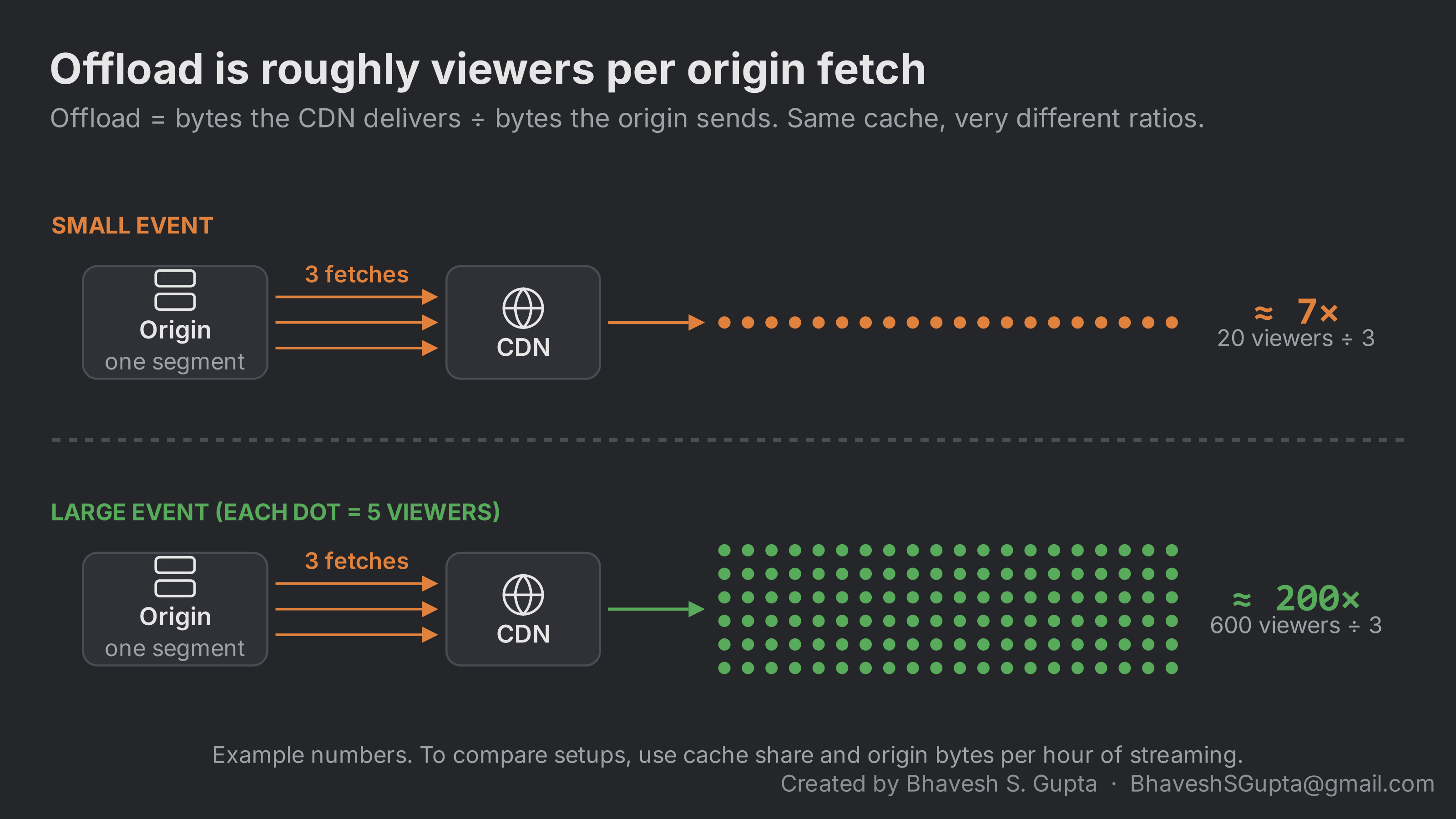
So a small event can show a low offload ratio even with a healthy cache. Cache share and origin bytes per hour of streaming are the fairer numbers to compare between setups.
Fewer fetches per segment: collapsing and an origin shield
The fetches-per-segment number is the one you can change. Two CDN features reduce it:
- Request collapsing (also called request coalescing): when many requests for the same uncached file arrive together, one goes to the origin and the rest wait for it. Without it, every viewer who asks for a new segment in the first few hundred milliseconds causes its own origin fetch.
- An origin shield (on Cloudflare, tiered cache): edge locations fetch from one designated mid-tier location instead of each going to the origin. However many edges have viewers, the origin sees one puller.
Both belong on the CDN that pulls from your origin. If a proxy such as Cloudflare sits in front of the origin only to set headers, its shield doesn’t help: the CDN behind it is the one deciding how many times to ask. Live HLS makes this harder than usual, because the newest segment is always uncached and in demand at the same moment. So confirm with your CDN provider:
- whether their pull locations collapse simultaneous requests for the same file, including for live content;
- whether an origin shield or tiered caching is available on your plan, and whether it’s on for your pull zone;
- how many locations pull from your origin, so you know what “one fetch per segment” should look like in your logs.
Then check the result in your origin or proxy logs: count requests per segment URL. A handful is healthy; one per viewer means nothing is being shared.
Check the origin’s allow-list mechanically
An origin behind a CDN or proxy should only accept connections from it. That usually means an allow-list of the provider’s published IP ranges on a firewall or load balancer, and that list is a good place for a mistake to hide. Say one entry should read 173.245.48.0/20 and someone types 73.245.48.0/20. The rule is valid, the config screen looks fine, and the symptom looks like nothing to do with it:
- The provider connects to your origin from many addresses. Only connections from the mistyped range are dropped, so failures are intermittent.
- Older segments are already cached and need no new connection, so only the newest segment fails, and only for viewers served by locations that happen to use that range.
- On Cloudflare this shows up as 522s (connection timed out) on the newest segment, from some regions and not others.
Don’t eyeball the list. Diff it against the provider’s published ranges:
| |
It downloads Cloudflare’s current IPv4 list, reads yours from allowed-cidrs.txt (one range per line, exported from your firewall or load balancer), and compares them as network ranges rather than as text. With the typo from above, it prints:
missing   173.245.48.0/20
extra     73.245.48.0/20
The pair tells the story: Cloudflare’s range isn’t allowed, and a range that isn’t Cloudflare’s is. Run the same check against https://www.cloudflare.com/ips-v6 if your origin accepts IPv6, and against any other provider’s published list in the same way.
Anything under “extra” is an address range you’re letting in that isn’t the provider’s, which is worth knowing too.
What to take from this
- Make segment URLs identical for every viewer, and test how your server treats a shared id.
- Give playlists, segments and errors different lifetimes, and never cache a 404.
- Check headers at every hop with
curl; what you configured isn’t always what gets sent. - On Cloudflare, mind rule order, status-code TTLs, and the difference between header rules and caching.
- Judge a CDN by cache share and origin bytes per hour, not by offload alone.
- Diff allow-lists against the provider’s published ranges.
- Keep query strings out of the cache key, and send CORS headers that survive every hop.
- Ask your CDN provider about request collapsing and an origin shield on the pulling side.
Frequently asked questions
Why is my CDN cache hit rate low for live HLS?
Usually because viewers ask for different URLs for the same segment: per-viewer session ids in file names, or tokens and cache-busters in the query string. Make URLs identical for everyone watching a stream and keep query strings out of the cache key.What Cache-Control headers should HLS playlists and segments use?
Media playlists aboutmax-age=1 (no more than half the target duration), segments about max-age=60, the master playlist an explicit short lifetime, and any error response no-store.Why does a CDN cache a 404 for a live stream?
Caches apply a default lifetime to errors unless told otherwise. On Cloudflare an edge TTL set for successful responses doesn’t cover a 404, which falls back to a default of minutes. Sendno-store on errors or set status-code TTLs.Do HLS streams need CORS headers?
Yes, when the page and the stream are on different domains and the player uses hls.js, as in Chrome, Edge and Firefox. Each playlist and segment needsAccess-Control-Allow-Origin, and every hop must pass it through. Safari’s native player doesn’t need it.Where should an origin shield go for live HLS?
On the CDN that pulls from your origin, together with request collapsing, so one fetch serves every viewer asking for a new segment. Confirm with your CDN provider that both are available and enabled for your pull zone, then count requests per segment in your origin logs.Further reading
- Cloudflare cache rules and how they’re ordered.
- Cloudflare default cache behaviour, including how long errors are kept.
- Cloudflare cache keys and tiered cache.
- Cloudflare’s published IP ranges.
- MDN: Cross-Origin Resource Sharing.
- RFC 8216, section 6.2.2 on how servers should serve live playlists.