Slide sync over HLS with ID3 timed metadata
Keep slides in sync with live HLS video using ID3 timed metadata: where tags sit in a segment, the rules they follow, and reading them in hls.js and Safari.
Table of Contents
A webcast with slides has to change the slide at the moment the presenter does, as the viewer sees it. Viewers are 10 to 30 seconds behind live, each by a different amount, so a message sent “now” from the presenter’s page arrives at the wrong time for everyone. The fix is to put the slide change inside the stream itself, at the right timestamp. In HLS that means ID3 timed metadata.
In short: To change slides at the exact moment the presenter did, put the change inside the stream as ID3 timed metadata. Each tag rides in the segment on its own data stream with a presentation timestamp, so the player fires it at the right frame however far behind live the viewer is. Put every tag in every quality, re-send the current slide regularly for late joiners, and read the tags through the video element’s metadata text track, which works in hls.js and Safari.
What ID3 timed metadata is
ID3 started as the tag format inside MP3 files. HLS reuses it: an MPEG-TS segment can carry a small ID3 frame on its own data stream, stamped with a presentation timestamp. When playback reaches that timestamp, the player hands the frame to the page.
Inside the segment, a table called the PMT lists the streams it carries, each with a type: H.264 video, AAC audio, and for the tags, type 0x15, timed metadata carried in PES packets with stream id 0xBD. Video, audio and metadata packets are interleaved, and each carries a presentation timestamp (PTS) on the same clock. That shared clock is what puts the slide change at the right frame.
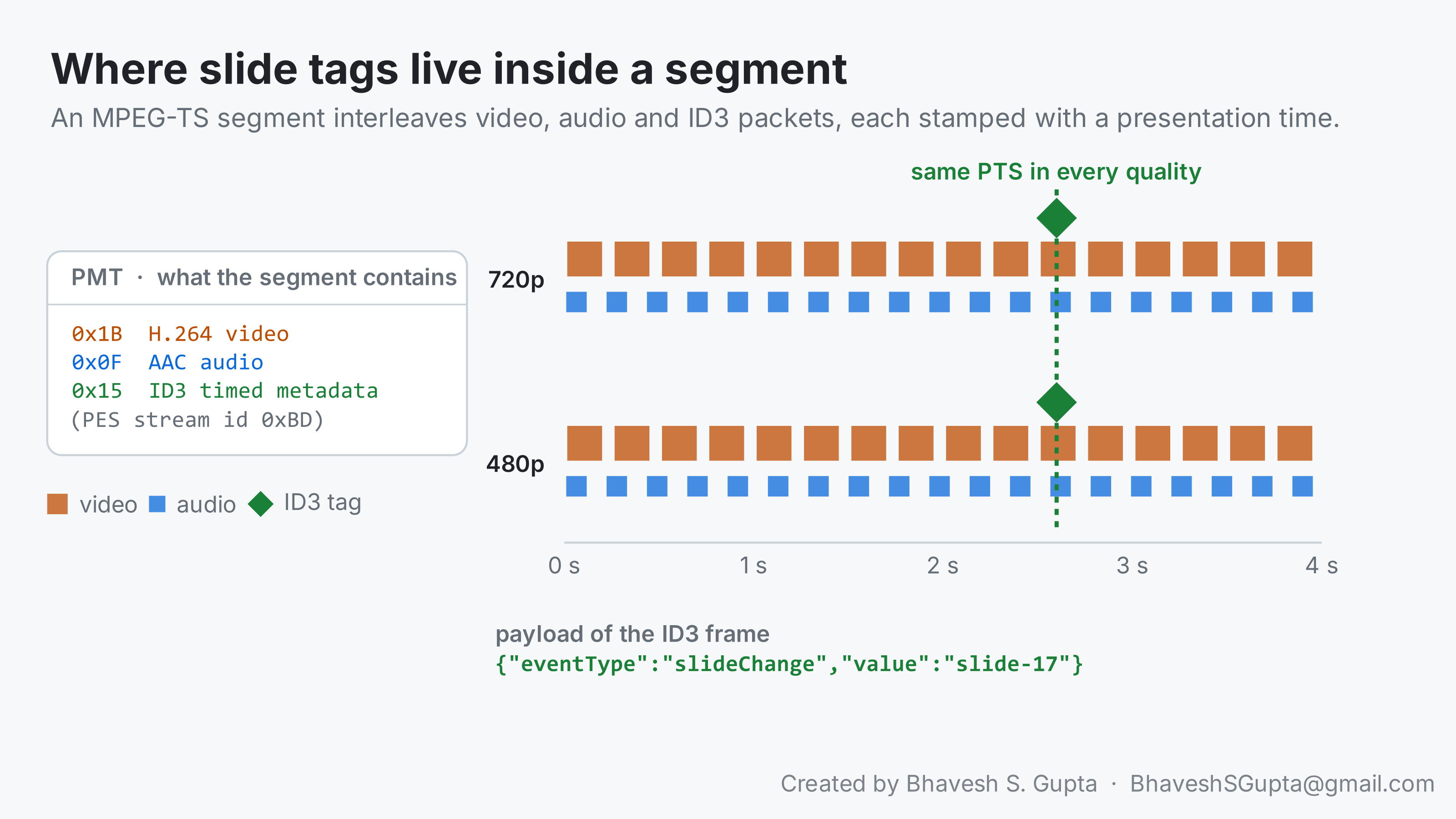
The payload is up to you; JSON in a text frame is common:
| |
Fragmented MP4 streams use a different box (emsg) for the same purpose; the rules below apply to both.
You can see whether a segment carries tags with ffprobe. A timed ID3 stream shows up as a data stream:
| |
Example output for a segment that carries tags:
stream|index=0|codec_name=h264|codec_type=video
stream|index=1|codec_name=aac|codec_type=audio
stream|index=2|codec_name=timed_id3|codec_type=data
The third line is the one you’re looking for: a data stream with codec timed_id3. If it’s missing, nothing in this segment can change a slide. Run it against every quality, not just one.
Where the conversion happens
Presenters and encoders usually talk RTMP, and in RTMP a slide change travels as a cue point in AMF, RTMP’s own data format. Browsers can’t read AMF. Something has to turn each cue point into an ID3 tag when the stream is packaged as HLS, and that something might be your streaming server or might be your CDN.
That distinction matters the moment you change either one. A CDN that pulls RTMP and packages HLS itself may or may not do the conversion. A CDN that pulls finished HLS from your origin and passes it through untouched will keep whatever tags your origin wrote. Before moving a stream, find out which box writes the ID3 today. If you can’t say, check: fetch a segment from your origin’s own HLS output and run the ffprobe above. If the tags are there, any pass-through path will keep them.
If you need tagged segments to test with, Apple’s HLS tools can make them (id3taggenerator creates the tags and mediastreamsegmenter inserts them while segmenting), and most streaming servers have a module or API for it.
Rules a tag has to follow
- Every quality, same timestamp. The player can switch quality at any segment. If a tag exists in one quality only, a viewer watching another one never sees that slide change.
- Re-send the current state. A viewer who joins after the last change has no tag to act on. Re-sending the current slide every 10 to 20 seconds means a late joiner shows the right slide within that time.
- Keep it small. A tag should be well under a kilobyte. It rides along in every segment of every quality.
- Parse defensively. One malformed tag shouldn’t break the page.
Reading the tags in the browser
Most web players play HLS one of two ways: through hls.js (Chrome, Edge, Firefox) or through the browser’s native player (Safari). Both expose ID3 tags as cues on a metadata text track, so one listener can serve both:
| |
What it does, step by step:
- Find the metadata track. Both engines create a text track with
kindset tometadatafor the ID3 stream, sometimes after the video has started, which is why it also listens foraddtrack. - Set it to
hidden. A track that’sdisableddoesn’t fire events;hiddendelivers cues without drawing anything. - React to
cuechange. It fires when playback reaches a tag’s timestamp.activeCuesholds the tags for that moment, so the slide changes at the frame the presenter changed it, however far behind live this viewer is. - Decode and parse defensively. Text frames may arrive as a string or as bytes, and one malformed tag shouldn’t stop the rest.
If you use hls.js directly, it also emits Hls.Events.FRAG_PARSING_METADATA with the raw samples and their timestamps. Player wrappers such as JW Player and Video.js forward the same tags through their own metadata events.
In both engines each cue’s value is an object with the ID3 frame’s id in key (such as TXXX for a user text frame or PRIV for a private one) and the payload in data. Text frames usually arrive as a string, binary ones as an ArrayBuffer, which is why the handler above decodes data when it isn’t a string. Log one cue from each browser when you wire this up; the exact shape has varied between versions.
Testing it end to end
- Check the origin output: tags present in every quality, at matching timestamps.
- Check through every hop: fetch the same segment via the CDN and compare it byte for byte with the origin’s copy. A pass-through path should be identical.
- Watch in two browsers at different qualities and confirm slides change at the same point in the video.
- Join late and check that the right slide appears within the re-send interval.
Frequently asked questions
How do you keep slides in sync with an HLS live stream?
Put each slide change into the stream as ID3 timed metadata. The tag carries a presentation timestamp, so the player hands it to the page when playback reaches that moment, whatever the viewer’s delay.Where are ID3 tags stored in an HLS segment?
In MPEG-TS, on their own data stream: the PMT lists it as stream type0x15, carried in PES packets with stream id 0xBD, each with a timestamp on the same clock as video and audio. ffprobe shows it as a timed_id3 data stream.How do I read ID3 metadata in hls.js and Safari?
Both expose tags as cues on a text track whose kind ismetadata. Set the track to hidden, listen for cuechange, and read cue.value.data. hls.js also emits FRAG_PARSING_METADATA with the raw samples.Why must slide tags be in every quality?
The player can switch quality at any segment. A tag that exists in only one quality is never seen by a viewer watching another.Further reading
- Apple’s HTTP Live Streaming resources
, including the timed metadata specification and the
id3taggeneratorandmediastreamsegmentertools. - hls.js API
, for
FRAG_PARSING_METADATAand the metadata track options. - MDN: the
cuechangeevent .
Next: it only fails in Safari , where the same faulty delivery breaks one browser and not the other.