It only fails in Safari: two HLS engines, and how to debug across hops
Why live HLS often fails in Safari but not Chrome: hls.js vs native recovery, a toolkit for debugging across CDN hops, and a go-live checklist.
Table of Contents
When a live stream breaks in Safari and plays in Chrome, the tempting conclusion is that Safari’s player is the problem. Often it isn’t. Both browsers receive the same files from the same CDN. They differ in what they do when one of those files is wrong, so a delivery fault that Chrome quietly recovers from becomes a Safari bug report.
In short: Chrome, Edge and Firefox usually play HLS through hls.js, which retries failed requests and skips small gaps; Safari uses its native player, which surfaces the same faults as errors or stalls. Both get identical bytes, so a problem that only shows in Safari is usually a delivery problem. Find it by measuring each hop separately: compare responses at the origin and the CDN, probe from many regions, group logs by browser, and inspect the segments.
Two engines behind one player
Web players such as JW Player and Video.js play HLS in one of two ways:
- hls.js and Media Source Extensions on Chrome, Edge and Firefox. A JavaScript library downloads playlists and segments itself and feeds the media to the browser. It retries failed requests on a configurable policy and can skip small gaps.
- The browser’s native HLS player on Safari for macOS, and usually on iOS, where every browser uses Safari’s engine. The page hands the browser a playlist URL and the browser does the rest. Its retry behaviour isn’t configurable, and it tends to surface an error or stall sooner.
Both see exactly the same responses. What differs is the recovery:
| Fault in delivery | hls.js | Native Safari |
|---|---|---|
| Playlist returns 404 at the start of an event | Retries and starts once the playlist exists | More likely to show an error straight away |
| Newest segment slow or missing | Retries, or skips past it | More likely to stall on it |
| Segment doesn’t start on a keyframe | Usually tolerated | Can hold playback until a keyframe arrives |
Page calls play() from a timer, not a click | Allowed once the user has interacted | Often blocked, so playback stays paused |
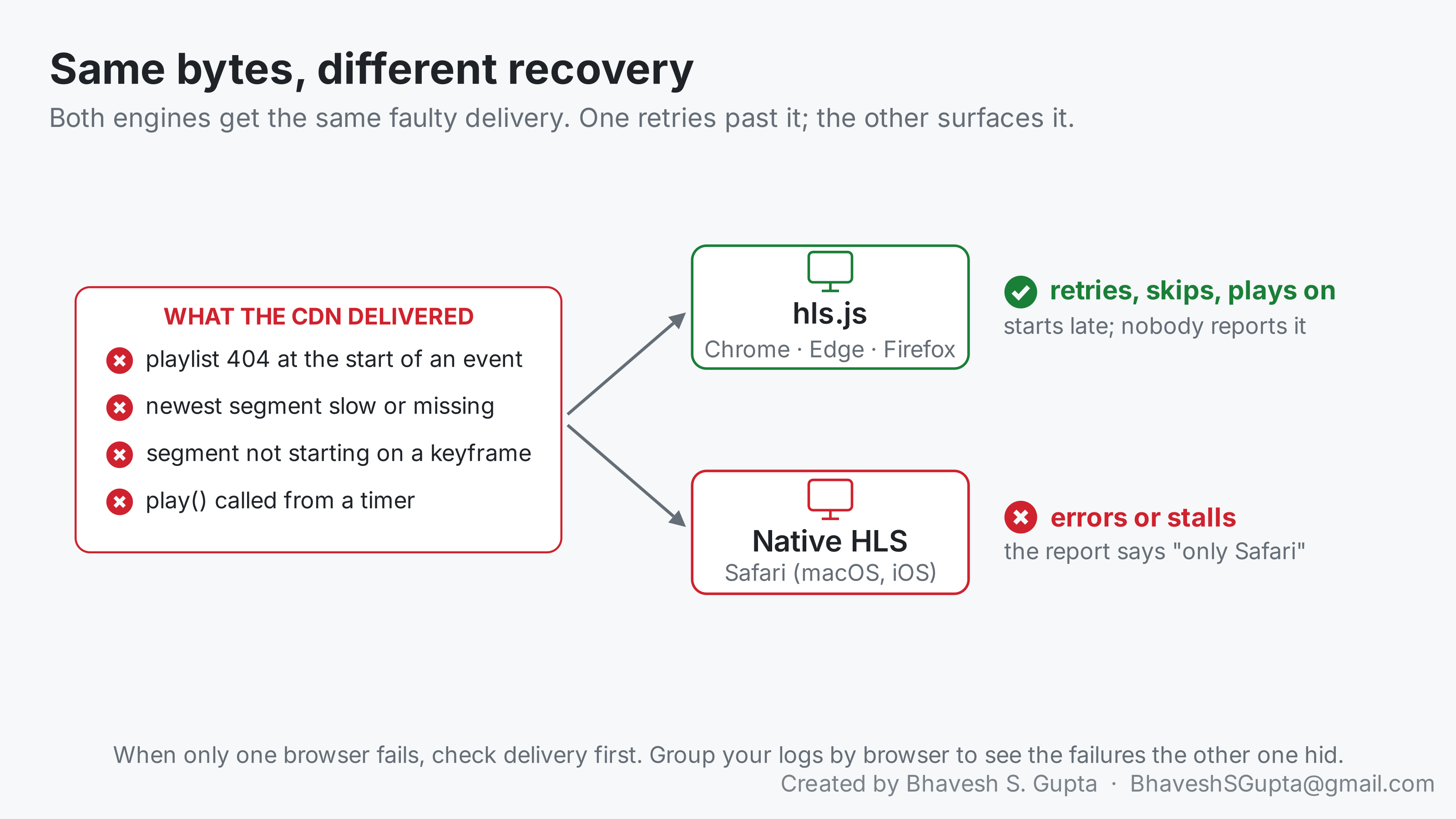
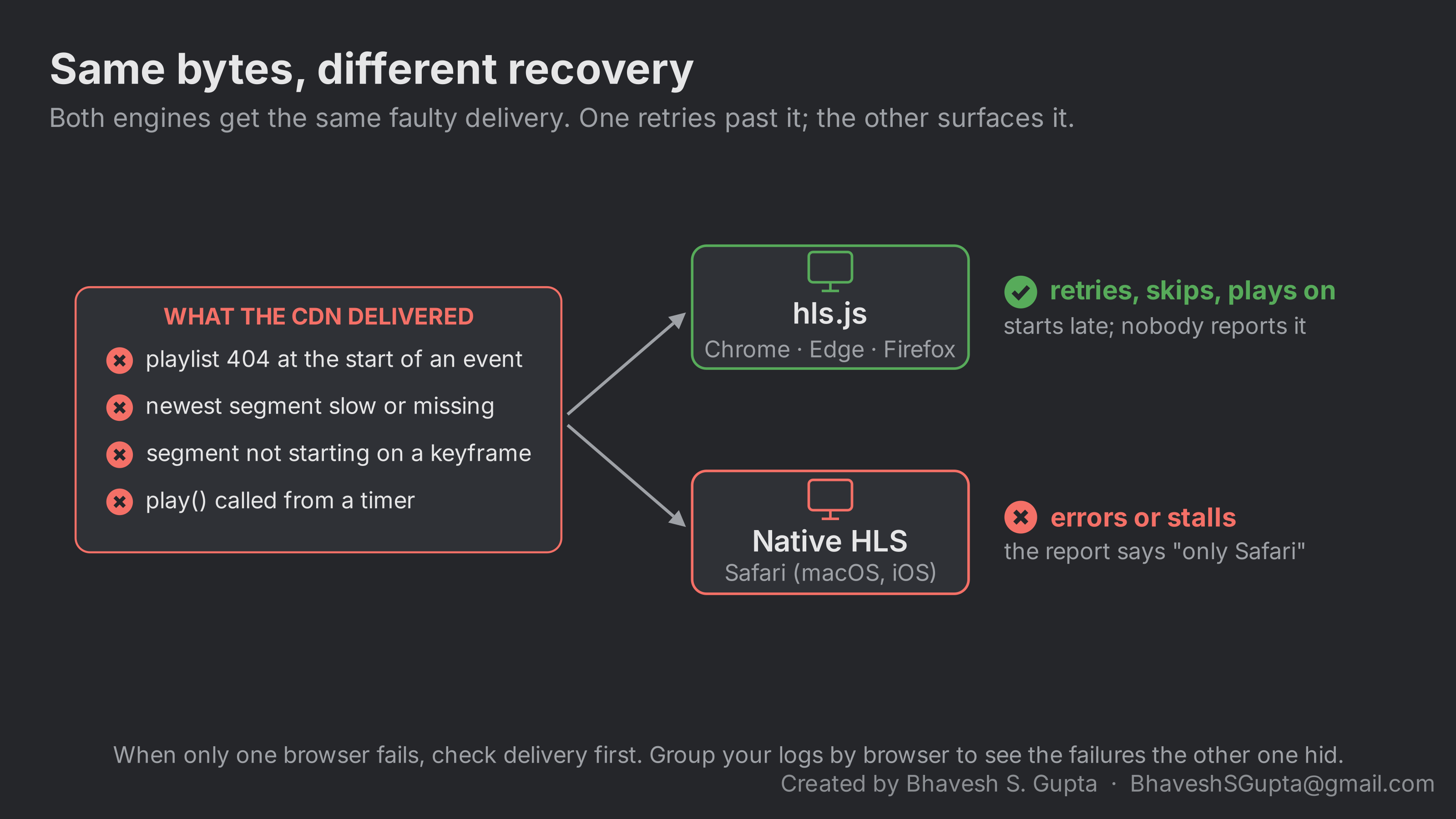
The difference comes from who’s in charge of the downloads. hls.js fetches every playlist and segment itself, with retry policies for each, and a gap controller that nudges playback past small holes. That’s all in JavaScript and configurable. With native HLS the browser does the fetching inside the media pipeline, with its own rules, and the page only sees the result: an error, a stalled event, or a waiting that doesn’t end.
You can reproduce each row yourself with a small proxy in front of a test stream. Make it return 404 for the playlist for the first minute, hold back the newest segment for a few seconds, or cut a segment that doesn’t start with a keyframe, then watch the same page in both browsers.
So “it only fails in Safari” is a signal to look at delivery first. Chrome’s logs usually show the same failed requests; hls.js just hid them.
A toolkit for debugging across hops
A live stream crosses several hops: encoder, origin, proxy, CDN, the viewer’s network, the player. Most wrong guesses come from blaming whichever layer you happen to be looking at. Measure each hop separately.
Fetch the same URL at every hop. Compare status, headers, size and timing at the origin, at any proxy, and at the CDN:
-o /dev/null throws the body away and -w prints a summary instead: status, bytes downloaded, and time to the first byte. Example output:
200 1180B 0.041s  https://origin.example.com/live/s1/chunklist.m3u8
200 1180B 2.870s  https://cdn.example.com/live/s1/chunklist.m3u8
Same status, same size, so both hops return the same playlist, but the CDN takes almost 3 seconds to start answering against 41 milliseconds at the origin. The slowness is between the CDN and the origin, or inside the CDN, not in the origin itself. Run it a few times; one slow sample is noise, a pattern isn’t.
Probe from many places. A fault that only affects some regions is invisible from your desk. Free tools such as Globalping or RIPE Atlas run the same request from dozens of locations, which separates “the origin is slow” from “some locations can’t reach it”.
Read the CDN and proxy logs by status and browser. Group failed requests by status code, path and User-Agent. If Chrome viewers have as many failures as Safari viewers, the problem isn’t Safari. Note that a CDN usually forwards the viewer’s User-Agent to the origin side, so a proxy’s security rules judge the viewer’s browser even though the connection comes from the CDN.
Look inside the segments. ffprobe tells you what’s actually being delivered: tracks and their bitrates, keyframe positions, timestamps, and data streams such as timed ID3. Byte-comparing a segment fetched through two paths proves whether a hop modifies it.
Diff configuration, don’t read it. Pull firewall rules, allow-lists and cache rules from the provider’s API and compare them with what they should be. A typo in one of many rules is easy to miss on screen and obvious in a diff.
Log from the player. In hls.js, listen to Hls.Events.ERROR and record data.type, data.details and data.fatal. For native playback, listen to the video element’s error, stalled and waiting events. A few lines of logging turn “it froze” into a request and a timestamp.
Check your own page code
Two small bugs are common in live-player pages, and both make recovery worse:
- Timers that stack. A “reload the stream if it’s been buffering for 30 seconds” timer started on every buffering event, without cancelling the previous one. A leftover timer later reloads a stream that had already recovered. Browsers that stall more often hit it more often.
- Unguarded parsing. Metadata parsed with
JSON.parseand notry/catch. One malformed tag throws, and that event is lost.
If a browser still struggles after the delivery fixes, two player-side options help: show a “tap to resume” button instead of calling play() from a timer, and on desktop Safari consider letting hls.js handle playback (most players have a setting for it) so both browsers recover the same way.
What to take from this
- When only one browser fails, check delivery before blaming the browser. Players differ in how they recover, not in what they receive.
- Measure each hop separately: origin, proxy, CDN, regions, player.
- Group failures by browser in your logs; you’ll often find the “working” browser failing just as much.
- Diff configuration against what it should be, mechanically.
- Guard your own page code: cancel timers, catch parse errors.
Go-live checklist
Everything the series says to check, in one place. Run it on a test stream before a real event.
Encoder and segments ( part 1 )
- Fixed keyframe interval (1 or 2 s) that divides the segment length; no extra keyframes at scene cuts
- Every
#EXTINFwithin the target duration; target duration matches the segment length you chose - Audio-only streams carry no video track, or the smallest possible one
- Every quality transcoded from the same source, with matching segment boundaries and first timestamps
Origin and CDN ( part 2 )
- Every viewer requests identical playlist and segment URLs (no per-viewer ids or query strings in the cache key)
- Shared ids tested: same content for repeat requests, after idle, after an encoder reconnect, and one id per stream
-
Cache-Controlper kind of file at the viewer: playlists ~1 s, segments ~60 s, master explicit, errorsno-store - An early request for a playlist that doesn’t exist yet isn’t cached (two requests, no
HIT) - CORS headers present at the viewer if the page and stream are on different domains
- Only one caching layer, or each layer’s rules and status-code TTLs understood
- Request collapsing and origin shield confirmed with the CDN provider; requests per segment checked in origin logs
- Origin allow-list diffed against the provider’s published ranges
Slides ( part 3 )
-
timed_id3stream present in every quality, tags at matching timestamps - Segments byte-identical at the origin and through the CDN
- Current slide re-sent regularly; a late joiner gets the right slide
Players (this part)
- Tested in Chrome and Safari, at more than one quality, from more than one region
- Player errors logged with type and timestamp, in both engines
- Page timers cancelled, metadata parsing wrapped in
try/catch, noplay()from a timer without a fallback
Frequently asked questions
Why does my HLS stream fail in Safari but work in Chrome?
Chrome usually plays HLS through hls.js, which retries failed requests and skips small gaps. Safari uses its native player, which tends to show an error or stall on the same faults. Both receive the same files, so check delivery first.Does Safari use hls.js?
Not by default. Safari on macOS plays HLS natively, and so do iOS browsers in most players. Many players can be configured to use hls.js on desktop Safari, which makes recovery behave the same as in Chrome.How do I debug a live stream across a CDN?
Measure each hop separately. Fetch the same URL at the origin and through the CDN and compare status, headers, size and timing; probe from many regions; group failures in the logs by status and browser; inspect segments with ffprobe; and log player errors with timestamps.Further reading
- hls.js API , for error types and retry policies.
- MDN: autoplay guide for media .
- Globalping and RIPE Atlas , for running the same request from many locations.
- ffprobe documentation .
This is the last part of the series. Part 1 covers the HLS basics everything here relies on.